FoxVox Update v3.7.1
FoxVox Update v3.7.1
NOTE Before Installing: I try hard to avoid breaking changes, however, there was an issue with using the Set Window Focus operation on outputs added in the last update where it supported either indicating the process or the window, however not both. This was a shortcoming that needed to be rectified. As a result, the focus process or window setting defined on any outputs will need to be redefined after this update. All other functions remain compatible.
Changelog:
- Add support for alternate device name mapping used on variable inputs.
- Add support for modulus operator (%) in formulas.
- Fix object disposal not releasing memory resources correctly.
- Fix problem with mouse wheel input capture getting locked.
- [Breaking] Update focus process/window to support all process/window combinations instead of only either/or (see note above).
Noteworthy Mention:
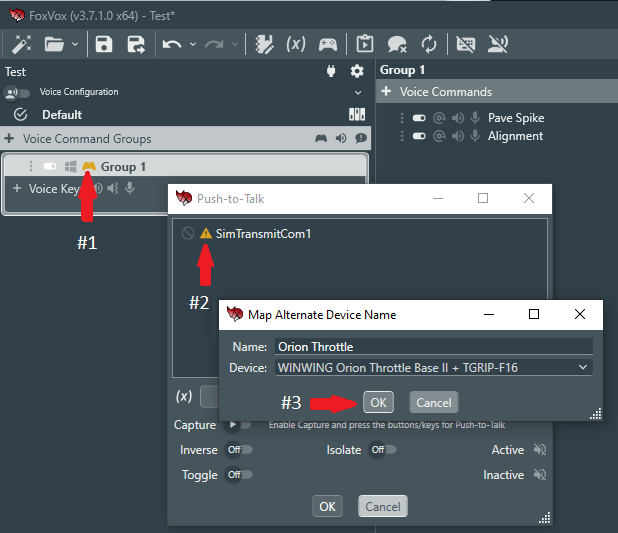
This update now makes it very easy to resolve binding errors associated with the FoxVox BMS Library. To resolve errors (indicated by PTT icons having a yellow warning color), first click on the PTT button to open the PTT editor window. You will see the variable input responsible displayed with a yellow warning icon next to it in the bindings list. Click on the icon. A window will open that will allow you to associate the missing device name (populated automatically) with one present on the system by selecting it from the dropdown list. Choose the correct device (typically the throttle) and click OK. Then click 'Cancel' on the PTT editor window, as there is no need to change the PTT binding. The yellow warning color on the PTT icons should go away and the UHF/VHF buttons should work without any issue. If using the Virtual Crew Chief, it may be necessary to also fix any other variable inputs on key commands in the same manner. These can be found on the following key commands defined on the 'Crew Chief Interactions' key command group:
- Nose Down
- Nose Up
- Roll Left
- Roll Right
- Yaw Left
- Yaw Right
- Left Brake Movement
- Left Brake No Movement
- Right Brake Movement
- Right Brake No Movement
Be sure to save your settings once this is complete. Alternate device name mappings created in this manner can be found, edited, or removed on the Device I/O tab under library settings.
Comments
Log in with itch.io to leave a comment.
thanks